
Free ISSN Barcode Generator — Create, Preview & Download Instantly
Generate ISSN barcodes online for free — no signup, no software, no limits. Enter a valid ISSN and get a crisp, print-ready barcode in PNG or SVG format within seconds. ISSN barcodes are the internationally recognized machine-readable identifier for periodicals, journals, magazines, newspapers, and serial publications. Real-time preview updates as you type. Download a single barcode or bulk-generate entire publication catalogs instantly.

What Is an ISSN Barcode?
The International Standard Serial Number (ISSN) is an eight-digit numeric identifier assigned to serial publications — including academic journals, magazines, newspapers, newsletters, and annual reports — by the ISSN International Centre in Paris and its national network of ISSN centers. Standardized under ISO 3297, each ISSN uniquely identifies a specific publication title regardless of language or country of origin. An ISSN barcode encodes this identifier in a machine-readable linear format — typically rendered as an EAN-13 barcode by prefixing the ISSN with '977' and appending a two-digit add-on suffix that encodes issue-specific pricing or sequence information. ISSN barcodes appear on the covers of virtually every commercially distributed periodical worldwide, enabling point-of-sale scanning, library check-in systems, subscription fulfillment, and press distribution workflows.
- Eight-Digit Serial Publication IdentifierAn ISSN consists of eight digits in the format XXXX-XXXX, where the final digit is a check character computed using Mod 11 with weights 8 through 2. The check character ensures that any single-digit transcription error is detected automatically. The ISSN identifies the publication title — not an individual issue or volume — meaning every issue of the same journal shares the same ISSN across all editions and formats, unless a format-specific ISSN (print vs. online) has been separately assigned.
- EAN-13 Barcode Encoding with Add-On SuffixISSN barcodes are encoded in EAN-13 format by prepending the prefix '977' to the seven significant ISSN digits (excluding the original check character), followed by a two-digit add-on number and a recalculated EAN-13 check digit. The resulting 13-digit base barcode is typically accompanied by a two- or five-digit supplemental add-on barcode that encodes the issue price or sequence number. This combined structure is defined in the ISSN Manual and is required by most magazine distributors and library suppliers.
- Automatic Check Digit CalculationBoth the Mod 11 ISSN check character and the EAN-13 check digit are calculated automatically by this generator. You only need to supply the raw ISSN number — the encoder handles all check digit computation, the 977 prefix mapping, and the add-on formatting internally. This eliminates the most common source of ISSN barcode errors: manually entered or incorrectly transcribed check digits.
- ISO 3297 and ISSN Manual ComplianceISSN barcodes generated by this tool conform to ISO 3297 (ISSN standard), the ISSN International Centre's ISSN Manual barcode specification, and the EAN/UCC barcode symbology standard for periodicals. The output meets the requirements of the major press distribution networks including Comag, Seymour, Frontline, and EBSCO, as well as library management systems such as Ex Libris, OCLC WorldCat, and Koha.
- Global Use Across Publishing and LibrariesISSN is the universal identifier for serial publications in over 100 countries. Publishers, printers, libraries, and distributors worldwide rely on ISSN barcodes for cover scanning at retail checkouts, library circulation desks, subscription mailrooms, and digital asset management systems. An accurate ISSN barcode on a periodical cover is a prerequisite for commercial distribution through newsstands, bookstores, and library supply chains.
ISSN specifications
The EAN-13-based identification number for serials — journals, magazines, and newspapers — with a 2-digit issue add-on. The table below lists the exact ISSN specifications — character set, check digit, X-dimension, quiet zone and the governing ISO 3297 (numbering); GS1 General Specifications (symbol) standard — so you can size and print the symbol correctly the first time.
| Character set | Digits 0-9 only |
|---|---|
| Data length | 8-digit ISSN expanded to 13 EAN digits; plus optional 2-digit issue add-on |
| Check digit | ISSN uses Mod 11 (X possible); the EAN-13 carrier uses Mod 10 |
| Density | Same as EAN-13 plus EAN-2 add-on |
| X-dimension (module width) | Nominal 0.33 mm X at 100% magnification |
| Quiet zone | 11X left / 7X right |
| Magnification | 80%-200% of nominal |
| Bar / space ratio | Variable-width bars and spaces (EAN structure) |
| Standard | ISO 3297 (numbering); GS1 General Specifications (symbol) |
| Introduced | 1975 — ISSN International Centre (Paris/UNESCO) |
Typical uses: Newsstand magazines and newspapers; Library serials cataloging and claiming; Subscription agency distribution and tracking.
How ISSN compares to similar barcode types
Choosing the wrong symbology is the most common cause of barcodes that scan in the warehouse but get rejected downstream. This table compares ISSN with the formats most often confused with it, on the three properties that decide compatibility: character set, check digit, and quiet zone.
| Symbology | Character set | Check digit | Quiet zone |
|---|---|---|---|
| ISSN(this page) | Digits 0-9 only | ISSN uses Mod 11 (X possible); the EAN-13 carrier uses Mod 10 | 11X left / 7X right |
| EAN-13 | Digits 0-9 only | Mandatory Mod 10 check digit, computed from the first 12 digits | 11X on the left, 7X on the right |
| EAN-2 | Digits 0-9 only | Hidden check digit encoded in the parity pattern, not printed as text | Separator gap from the main symbol; quiet zone on the outer side |
| ISBN | Digits 0-9 only (13-digit ISBN/EAN; 5-digit add-on) | Mandatory Mod 10 check digit (same algorithm as EAN-13) | 11X left / 7X right (EAN-13 geometry) |
| ISMN | Digits 0-9 only | Mandatory Mod 10 check digit | 11X left / 7X right |
How to Create an ISSN Barcode — Step-by-Step
Creating a print-ready ISSN barcode for your publication cover with this free online generator takes under a minute. Follow these four steps:
Enter Your ISSN
Type or paste your eight-digit ISSN into the input field in the standard XXXX-XXXX format (e.g., 0311-175X). The generator accepts ISSN strings with or without the hyphen separator. If you are encoding a two-digit add-on supplement — used to indicate issue sequence or price — append a space and the two-digit add-on value (e.g., '0311-175X 00').
Adjust Size and Appearance
Use the settings panel to set bar height, module width, and quiet zone to match your cover artwork dimensions. For standard newsstand magazines, the barcode box is typically 30–40mm wide and 22–25mm tall. Toggle the human-readable ISSN text on or off to match your cover design. The live preview reflects every adjustment instantly.
Preview and Validate
Confirm the barcode preview is correct: verify that the human-readable text shows the expected ISSN, that the bar pattern is clean and well-spaced, and that the quiet zones on both sides are clear. For production covers, scan the on-screen preview with a retail barcode scanner or mobile scanner app to confirm readability before submitting to your printer.
Download or Copy
Click the SVG download button for a resolution-independent vector file ready for InDesign, Illustrator, or direct embedding in cover layout files. Click PNG for a high-resolution raster image suitable for Word documents, email proofs, or label printing. For multiple publication titles, switch to the bulk input panel, paste your ISSN list, and download a ZIP of all barcodes at once.
Who Should Use This ISSN Barcode Generator?
This free online ISSN barcode generator is built for everyone in the publishing supply chain who needs accurate, distribution-compliant barcodes without specialized software. Here is who benefits most.
Magazine and Journal Publishers
Generate ISSN barcodes for every issue of your periodical titles — including the correct 977-prefix EAN-13 format and add-on supplement — ready to embed directly in cover artwork files sent to your printer. No barcode design software or subscription required.
Library and Information Professionals
Create ISSN barcodes for serials cataloging, binding labels, and physical check-in workflows. Bulk-generate barcodes for entire journal holdings lists and download as SVG or PNG for use with your library management system or label printing software.
Press Distributors and Wholesalers
Produce ISSN barcodes for distribution manifests, bundle labels, and retailer allocation sheets. Bulk-import title lists and generate all barcodes in one operation, downloading a ZIP archive ready for integration into your warehouse management or POS systems.
Designers and Prepress Studios
Quickly generate a compliant ISSN barcode SVG to drop into a magazine cover layout or press-ready PDF without needing a dedicated barcode plug-in. Verify the barcode visually in the live preview and confirm scanner readability before sending the file to press.
ISSN Barcode Generator Features
Everything you need to create publication-ready ISSN barcodes — from automatic check digit calculation and add-on suffix support to bulk generation, size controls, and lossless SVG output.
Automatic 977 Prefix and EAN-13 Conversion
Enter any valid eight-digit ISSN and the generator automatically applies the '977' ISSN prefix, strips the original check character, appends the add-on sequence digits, and recalculates the EAN-13 check digit — producing a fully compliant ISSN barcode without any manual number manipulation. The human-readable text beneath the barcode displays the correctly formatted ISSN string.
Real-Time Preview as You Type
The barcode preview updates live with every keystroke. See the exact barcode that will appear on your publication cover — including the EAN-13 base symbol, the add-on supplement bars, and the human-readable ISSN text — before downloading or sending to a printer. Invalid ISSN formats are flagged immediately.
PNG and SVG Download
Download your ISSN barcode as a high-resolution PNG for digital proofs, internal documents, and email, or as a lossless SVG for print-ready cover artwork, prepress workflows, and editorial design files. SVG barcodes scale to any size without pixelation, making them ideal for embedding directly in InDesign, Illustrator, or Affinity Publisher layouts.
Adjustable Width, Height, and Quiet Zone
Control the bar height, module width (X-dimension), and quiet zone margins of your ISSN barcode to match your cover layout requirements. Quiet zones — the mandatory blank spaces flanking the barcode — are included at the correct minimum width per the ISSN Manual and EAN-13 specification to ensure reliable point-of-sale scanning.
Human-Readable Text — Show or Hide
Toggle the human-readable ISSN number displayed beneath the barcode on or off. When enabled, the formatted ISSN string is printed below the bars in a standard font — required by most distributors so newsstand staff can visually verify the publication. Disable the HRI for custom cover designs that display the ISSN in a separate typographic treatment.
Bulk Barcode Generation
Generate ISSN barcodes for an entire publication catalog in one operation. Enter one ISSN per line in the bulk input panel and download all barcodes as a ZIP archive of PNG or SVG files. Ideal for publishing houses, library cataloging teams, or subscription fulfillment services that need to process multiple journal titles simultaneously.
No Signup, No Watermarks, No Limits
This ISSN barcode generator is completely free with no usage caps, no account required, and no watermarks on downloaded files. All barcode encoding happens in your browser — your publication data is never transmitted to any server. Generate one barcode or process an entire journal portfolio; the tool imposes no limits and retains no data.
ISSN Barcode Use Cases & Real-World Examples
ISSN barcodes appear across the entire publishing and library supply chain. Here are the most common real-world applications.

Magazine and Periodical Cover Scanning
Every commercially distributed magazine carries an ISSN barcode on its cover, enabling point-of-sale scanning at newsstands, bookstores, and supermarket checkouts. The barcode encodes the ISSN together with an issue-specific add-on code, allowing retailer POS systems to identify not just the publication title but the specific issue being purchased for inventory reconciliation and returns processing.

Academic Journal and Library Cataloging
University libraries, national libraries, and public library networks rely on ISSN barcodes for serials cataloging, check-in, and circulation workflows. Library management systems use the ISSN to link physical issues to MARC bibliographic records and digital holdings in WorldCat, enabling seamless interlibrary loan requests, e-resource access management, and subscription renewal tracking.
Press Distribution and Fulfillment Networks
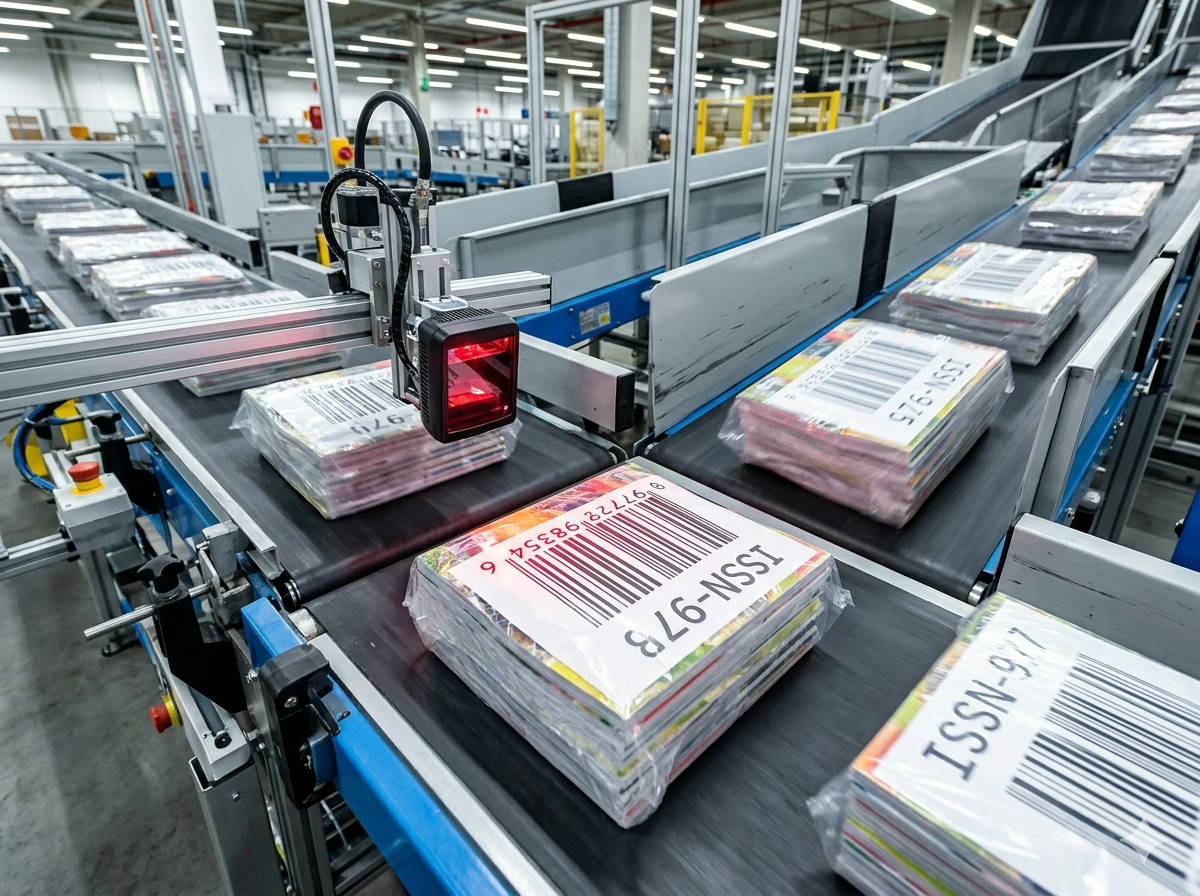
Press distributors and subscription fulfillment houses use ISSN barcodes to sort, route, and track periodical deliveries through automated processing systems. Scanners read ISSN barcodes on bundles and individual copies to update delivery manifests, calculate retailer allocations, and process unsold return credits — all without manual data entry.
Subscription and Mailing Label Processing
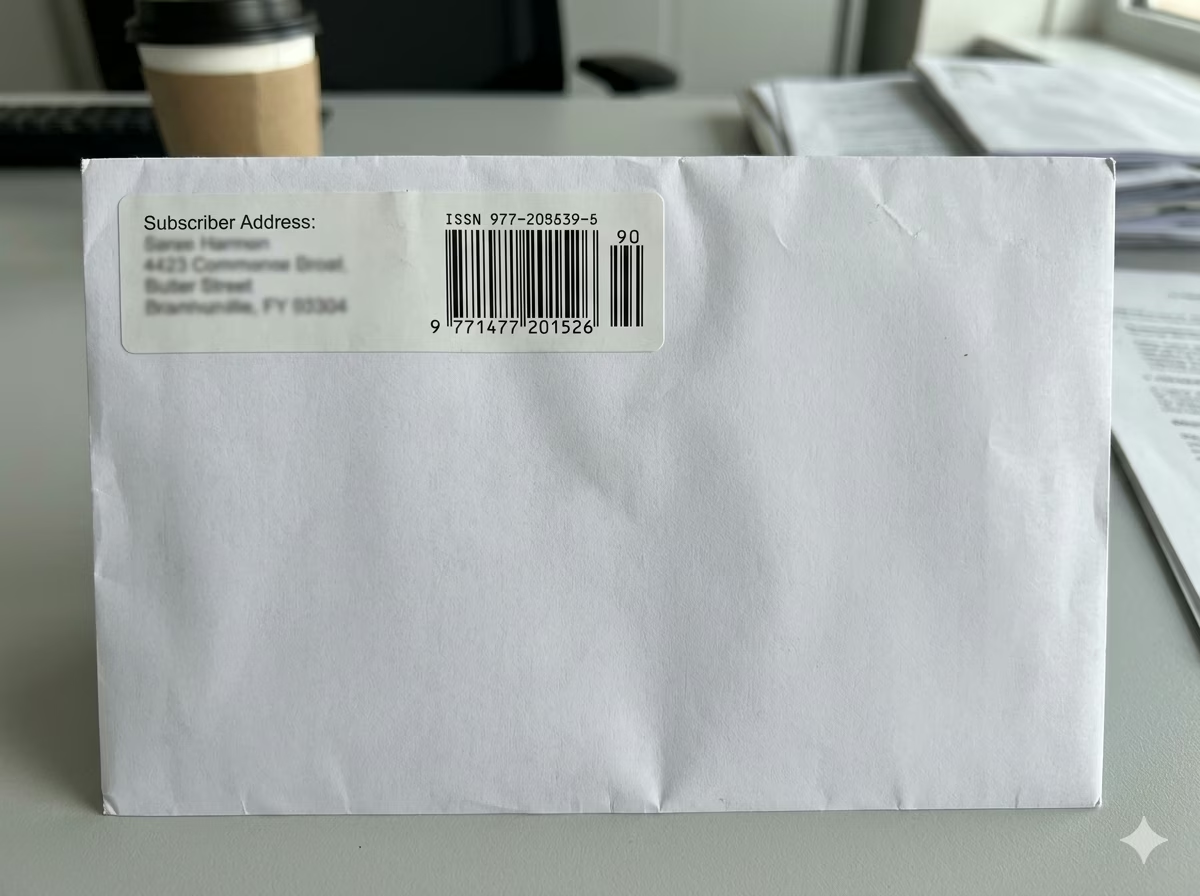
Magazine subscription mailrooms and mailing bureaus encode ISSN barcodes on subscriber address labels and delivery envelopes. Postal automation systems read these barcodes to apply correct postage rates for periodical mail class, track delivery confirmation, and reconcile subscriber address change requests against the publication's circulation management database.

Newspaper Cover Identification
Daily, weekly, and regional newspapers carry ISSN barcodes for retail identification and distribution tracking. Unlike magazines, newspapers may encode a date-based add-on suffix instead of a price code, allowing wholesalers and retailers to distinguish issues by publication date during high-speed automated scanning on inbound delivery processing lines.

Digital Publishing and Metadata Management
Digital publishers and e-journal platforms use ISSNs to link print and online editions, manage DOI registration, and populate CrossRef, SHERPA/RoMEO, and DOAJ metadata records. ISSN barcodes generated from this tool can be embedded in digital cover images, PDF cover pages, and e-reader metadata fields to maintain consistent title identification across print and digital distribution channels.
ISSN Barcode — Frequently Asked Questions
Technical answers to the most common questions about ISSN encoding rules, the 977 prefix, add-on supplements, check digit calculation, and practical usage for publishers.
What is an ISSN and what does it identify?
An ISSN (International Standard Serial Number) is an eight-digit numeric identifier assigned to a serial publication — any periodical issued in a continuing series under a consistent title, including academic journals, magazines, newspapers, newsletters, yearbooks, and monographic series. Defined by ISO 3297, the ISSN identifies the publication title, not a specific issue or volume. A single title may hold two ISSNs: one for the print edition (print ISSN / pISSN) and one for the online edition (electronic ISSN / eISSN). ISSNs are registered and maintained by the ISSN International Centre in Paris and its network of over 90 national ISSN centers.
How is an ISSN encoded as a barcode?
An ISSN is encoded as a barcode using the EAN-13 symbology with a '977' publication prefix. The encoding process: (1) take the seven significant digits of the ISSN (digits 1–7, excluding the original ISSN check character); (2) prepend '977' to get 10 digits; (3) append a two-digit add-on number (typically '00' if no issue-specific code is needed); (4) calculate the EAN-13 check digit from the resulting 12-digit string. The final 13-digit number is encoded as a standard EAN-13 barcode. A two-digit supplemental add-on barcode is printed to the right of the main symbol to carry the issue sequence or price code.
What is the ISSN check digit and how is it calculated?
The ISSN check digit is the eighth and final character of the ISSN, which may be a digit (0–9) or the letter 'X' (representing 10). It is calculated using Mod 11 with alternating weights 8, 7, 6, 5, 4, 3, and 2 applied to the first seven ISSN digits. The sum of the weighted products is divided by 11; the check digit is 11 minus the remainder (using 'X' if the result is 10, and '0' if the result is 11). This generator computes the check digit automatically — you do not need to calculate or supply it separately. The ISSN check digit is not the same as the EAN-13 check digit used in the barcode.
What is the add-on supplement printed next to the ISSN barcode?
The two-digit add-on supplement to the right of the main ISSN EAN-13 barcode is an optional but widely used extension that encodes issue-specific information — most commonly a sequence number (01, 02, 03…) for each issue within a volume year, or a price code used by press distributors. Some publishers use '00' as a generic placeholder when no issue-specific code is required. The ISSN Manual recommends always including the two-digit add-on to ensure compatibility with distributor scanning systems, even if the value is simply '00'.
What is the difference between a print ISSN and an electronic ISSN?
A print ISSN (pISSN) is assigned to the physical printed edition of a serial publication. An electronic ISSN (eISSN) is assigned to the online or digital edition of the same title. Both are registered separately with the ISSN International Centre. For barcode purposes, only the print ISSN is typically encoded on the physical cover of a printed periodical. Online publications may embed the eISSN in PDF cover pages, HTML metadata, or digital distribution manifests, but a barcode on a physical product always uses the print ISSN.
Is the ISSN barcode the same as an ISBN barcode?
No. ISSN and ISBN are separate international numbering systems for different publication types. ISBN (International Standard Book Number) identifies individual book editions — non-serial, single-issue publications. ISSN identifies serial publications — periodicals issued as a continuing series under a consistent title. Both use EAN-13 barcode encoding, but with different prefixes: ISBNs use the '978' or '979' Bookland prefix, while ISSNs use the '977' prefix. A publication that is both a series title and a standalone volume (such as an annual handbook or conference proceedings) may carry both an ISBN (for that specific issue) and an ISSN (for the series).
What size should an ISSN barcode be on a magazine cover?
The ISSN Manual and EAN barcode specifications recommend a standard size (100% magnification) EAN-13 barcode of 37.29mm wide × 25.93mm tall (excluding quiet zones and the add-on supplement). For magazine covers, barcode widths between 80% and 200% of standard size are acceptable — corresponding to approximately 30–75mm wide. The minimum recommended magnification for reliable retail scanning is 80% (about 29.8mm wide). Always include the mandatory quiet zones: a minimum of 3.63mm to the left, 2.31mm to the right of the EAN-13 symbol, and additional space for the add-on supplement.
Is my publication data safe when using this generator?
Yes. All ISSN barcode encoding is performed entirely in your browser using client-side JavaScript. Your ISSN numbers and any associated publication data are never transmitted to any server and never stored anywhere. Close the browser tab and all data is gone. This tool is safe to use with unpublished ISSN assignments, pre-launch title identifiers, and commercially sensitive distribution codes.
Specification reference
Read the full ISSN specification — character set, check digit, quiet zone, density, and the governing ISO 3297 (numbering); GS1 General Specifications (symbol) standard — in our barcode glossary.
ISSN specificationRelated barcode types
Compare ISSN with similar symbologies, or open their full specifications.
- EAN-13
The 13-digit retail point-of-sale barcode used on consumer products worldwide outside North America.
- EAN-2
A 2-digit add-on barcode beside EAN-13/UPC on magazines and newspapers, typically carrying the issue number.
- ISBN
The book trade's EAN-13 — an ISBN-13 product number, usually with a 5-digit price add-on.
- ISMN
The EAN-13-based identification number for printed music — scores, sheet music, and parts.
Related barcode tools
Need more than one barcode, a printed label sheet, or a way to check the result? These tools use the same generator, so the output matches.
- Bulk Barcode GeneratorImport Excel or CSV, paste a list, or create a sequence and get a barcode for every row. Export as PNG, SVG, JPG, or a ZIP.
- Barcode Label PrintPrint a full sheet of labels that lines up with Avery label stock, at the correct physical size.
- Barcode ScannerVerify a printed label before you run the whole batch — decode it from an image or your camera.
- Barcode MakerFull control over size, colors, font, quiet zone, and layout for a single barcode.
Generate Your ISSN Barcode Now — Free, Instant, No Account Required
This free ISSN barcode generator is ready to use immediately. Enter your ISSN, adjust the barcode size to match your cover layout, and download a print-ready PNG or SVG in seconds. No signup, no watermarks, no usage limits. Automatic 977-prefix conversion and check digit calculation included. All encoding happens locally in your browser — your publication data stays private. Generate one barcode or process an entire journal catalog; the tool is completely free regardless of volume.